SpreadHitscanShooter MonoBehaviour
Overview
The SpreadHitscanShooter module is in effect a number of HitscanShooter modules in one.
Inspector
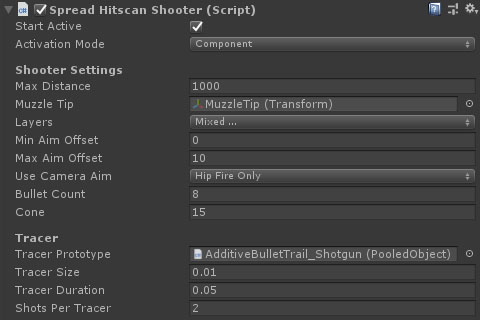
Properties
| Name | Type | Description |
|---|---|---|
| Start Active | Boolean | Should this module register as the active shooter immediately on start. |
| Activation Mode | Dropdown | How does module activation work. Options are: Component means the component will be enabled / disabled - use this when you have multiple modules on an object such as the firearm root. GameObject activates / deactivates the object - use this for attachments where you want the geo to appear/disappear. |
| Max Distance | Float | The maximum distance that the weapon will register a hit. |
| Muzzle Tip | Transform | The transform that the bullet actually fires from. |
| Layers | LayerMask | The physics collision layers the shot can hit. |
| Min Aim Offset | Float | The maximum angle from forward the shooter can fire when accuracy is 1. |
| Max Aim Offset | Float | The maximum angle from forward the shooter can fire when accuracy is 0. |
| Use Camera Aim | Dropdown | When set to use camera aim, the gun first casts from the FirstPersonCamera's aim transform, and then from the muzzle tip to that point to get more accurate firing. Options are: HipFireOnly, HipAndAimDownSights, AimDownSightsOnly, Never. |
| Bullet Count | Int | How many pellets are fired each shot. |
| Cone | Float | The spread of the cone in degrees. |
| Tracer Prototype | Pooled Object | The optional pooled tracer prototype to use (must implement the IPooledHitscanTrail interface). |
| Tracer Size | Float | The size (thickness/radius) of the tracer line. |
| Tracer Duration | Float | How long should the tracer object stay visible. |
| Shots Per Tracer | Int | How many pellets are required per tracer line. |