SetAudioEffectStrength MotionGraphBehaviour
Overview
The SetAudioEffectStrength behaviour connects to an FpsCharacterAudioEffects behaviour on the character's camera object. It will set the strength of one of the effects presets on entering or exiting the state or sub-graph.
Inspector
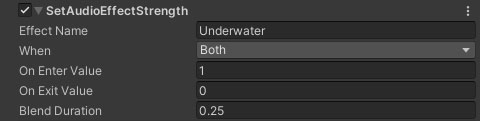
Properties
| Name | Type | Description |
|---|---|---|
| Effect Name | String | The name of the audio effect on the character camera's FpsCharacterAudioEffects component. |
| When | Dropdown | When should the parameter be modified (OnEnter, OnExit or Both). |
| On Enter Value | Float | The strength the effect should be set to on entering the state / subgraph. |
| On Exit Value | Float | The strength the effect should be set to on exiting the state / subgraph. |
| Blend Duration | Float | The time taken to blend from the current strength to the target strength. |