ProceduralFirearmSprintHandler MonoBehaviour
Overview
The AnimatedFirearmSprintHandler behaviour is attached to a modular firearm to model different sprinting mechanics. This version uses procedural animation to move the firearm into a sprint pose and add an additive transform bob effect.
Inspector
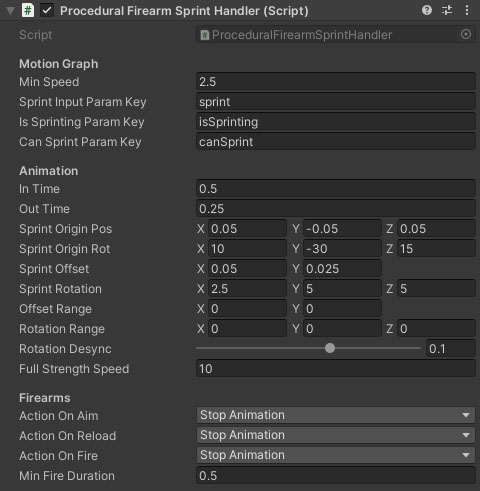
Properties
Motion Graph
| Name |
Type |
Description |
| Min Speed |
Float |
The minimum speed the character must be moving for the sprint animation to play. |
| Sprint Input Param Key |
String |
(Required) The switch parameter on the motion graph which is set by the input handler to tell the character when to sprint. |
| Is Sprinting Param Key |
String |
(Required) A switch parameter on the motion graph which the graph sets when the character is sprinting. |
| Can Sprint Param Key |
String |
(Optional) A switch parameter on the motion graph which tells the character if it can sprint or not. |
Animation
| Name |
Type |
Description |
| In Time |
Float |
The time taken to blend into the sprint animation. |
| Out Time |
Float |
The time taken to blend out of the sprint animation to idle. |
| Sprint Origin Pos |
Vector |
The neutral weapon / item position in sprint pose before bob is applied. |
| Sprint Origin Rot |
Vector |
The neutral weapon / item rotation in sprint pose before bob is applied. |
| Sprint Offset |
Vector |
The peak position offset of the step cycle on the z and y axes (z does not change). |
| Sprint Rotation |
Vector |
The peak rotation of the step cycle on each axis. |
| Offset Range |
Vector |
A position offset range either side of the sprint offset that will be randomised with each step to add variety. |
| Rotation Range |
Vector |
A rotation offset range either side of the sprint sprint that will be randomised with each step to add variety. |
| Rotation Desync |
Float |
The offset in terms of one full step cycle (left and right) for the timing of the rotation. Positive means after the position, Negative means before. |
| Full Strength Speed |
Float |
The speed at which the full sprint animation strength is reached. This fades out the rotation aspect as the character slows down. |
Firearms
| Name |
Type |
Description |
| Action On Aim |
Dropdown |
What to do when the firearm enters / exits ADS. Stop Sprinting completely stops the character from sprinting until they leave ADS. Stop Animation stops the firearm sprint animation without affecting the character movement. CannotAim blocks the player from aiming down sights while sprinting. |
| Action On Reload |
Dropdown |
What to do when the firearm is reloaded. Stop Sprinting completely stops the character from sprinting until the reload animation completes. Stop Animation stops the firearm sprint animation without affecting the character movement. |
| Action On Fire |
Dropdown |
What to do when the firearm trigger is pulled while sprinting. Stop Sprinting completely stops the character from sprinting until the weapon stops firing. Stop Animation stops the firearm sprint animation without affecting the character movement (both of these have a slight delay before firing to allow the weapon to be aligned). Cannot Fire means that the firearm trigger is blocked until the character stops sprinting. |
| Min Fire Duration |
Float |
The minimum amount of time the firearm sprint animation will be paused or sprinting blocked when the trigger is pulled. Prevents rapid tapping of the trigger popping in and out of sprint. |
See Also
Modular Firearms
The Motion Graph
Additive Transforms & Effects