InputSystemFirearmWithSecondary MonoBehaviour
Overview
The InputSystemFirearmWithSecondary behaviour handles input for a modular firearm with another weapon as a secondary behaviour. This secondary weapon can be either a modular firearm, wieldable tool, melee weapon or thrown weapon. The secondary weapon is triggered via the secondary fire button (meaning that the firearm cannot aim down sights), and when either weapon is blocked (for example when the firearm is reloading) the other will also be blocked at the same time. This is the input system equivalent of the [InputFirearmWithSecondary][inputref-mb-inputfirearmwithsecondary.md] input handler.
Inspector
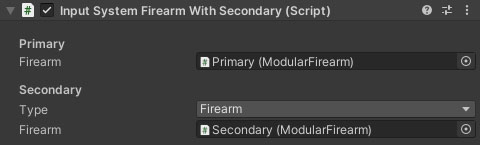
Properties
| Name | Type | Description |
|---|---|---|
| Firearm | String | The primary firearm. |
The secondary weapon section has the following properties:
| Name | Type | Description |
|---|---|---|
| Type | Dropdown | The type of weapon to use for the secondary. |
| Firearm | ModularFirearm | The modular firearm behaviour for the secondary. This property will only be visible if the Type property is set to this type. |
| WieldableTool | WieldableTool | The wieldable tool behaviour for the secondary. This property will only be visible if the Type property is set to this type. |
| Melee | MeleeWeapon | The melee weapon behaviour for the secondary. This property will only be visible if the Type property is set to this type. |
| Thrown | ThrownWeapon | The thrown weapon behaviour for the secondary. This property will only be visible if the Type property is set to this type. |