Thrown Weapons
Overview
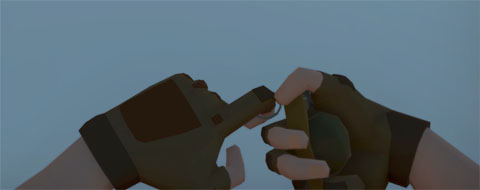
Thrown weapons in NeoFPS are a weapon that will spawn a PooledObject at a specified point with a set velocity. They can be stacked so that the character can carry a number of them. Each throw the stack is reduced until all have been used, at which point the item is removed from the character inventory.
Thrown weapons have a strong throw and a weak throw. They can also inherit velocity from the character as it moves in a similar style to games like Counter Strike.
The NeoFPS thrown weapons system will be expanded with more options in future updates.
Wieldables vs Quick-Throw
The demo frag grenade is set up as a wieldable. That means that it is equipped when selected, and then you have to hit fire to throw the grenade. You can achieve this with your weapons by adding an FpsInventoryWieldable or FpsInventoryWieldableSwappable behaviour to the root of your weapon prefab depending on your choice of inventory. These handle selection and deselection, and also define which quick-slot they apply to.
Alternatively, you can set up your thrown weapons as quick-use items. This means that when you select them, the weapon will raise and then immediately throw before lowering again. This can be used alongside another equipped weapon (optionally interrupting its use). To achieve this, you would add an FpsInventoryQuickUseItem or FpsInventoryQuickUseSwappableItem behaviour to the root of your prefab instead of the wieldable behaviours above.
Weapon Pickups
You can create a pickup object for your thrown weapon using the Pickup Wizard in the NeoFPS Hub. This allows you to pick the weapon up in the scene, but also to drop it from your hands and pick it up again later.
Thrown Weapon Animations
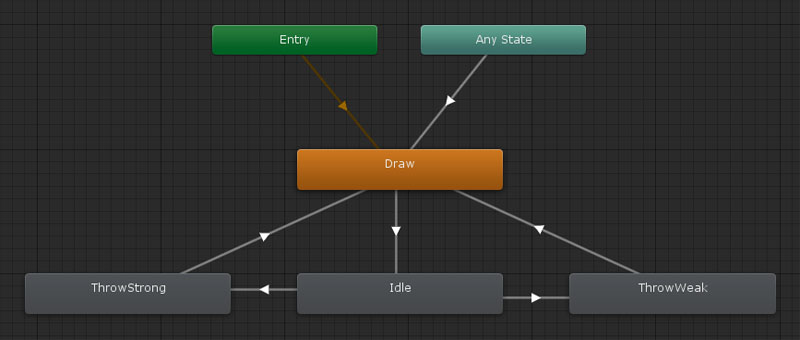
The thrown weapon animations are relatively simple. See the sample assets for details on how the graph is set up.
The relevant animator controller properties are:
| Name | Type | Description |
|---|---|---|
| Draw | Trigger | Used when the weapon is drawn to raise it from off the screen. This is also the entry state of the controller. |
| Throw Light | Trigger | Signals the start of a weak throw attack. |
| Throw Heavy | Trigger | Signals the start of a strong throw attack. |
The property names can be changed in the ThrownWeapon behaviour.
Alongside keyframed animation, NeoFPS also allows you to add procedural animation to your weapons using Additive Transforms and Effects. These can be very simple, such as the weapon and head bob effects. They can also be more complicated, such as the procedural sprinting animation using the ProceduralThrownSprintHandler. For larger scale movements, the main thrown weapon behaviour has a pose system built in which allows for seamless transitions between poses and is used by the sprinting system along with the ThrownWieldableStanceManager.