InputSystemDualWield MonoBehaviour
Overview
The InputSystemDualWield behaviour handles input for a dual wield weapon. This is actually 2 separate weapons parented to one object, and each one can be either a modular firearm, wieldable tool, melee weapon or thrown weapon. The weapons can be triggered independently using the primary and secondary fire buttons, or set to both trigger on primary fire and allow aiming down sights instead. It is the input system equivalent of the [InputDualWield][inputref-mb-inputdualwield.md] input handler.
Inspector
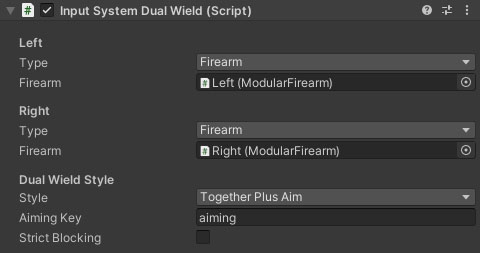
Properties
Each of the Left and Right weapon sections has the following properties:
| Name | Type | Description |
|---|---|---|
| Type | Dropdown | The type of weapon to use. |
| Firearm | ModularFirearm | The modular firearm behaviour for this weapon. This property will only be visible if the Type property is set to this type. |
| WieldableTool | WieldableTool | The wieldable tool behaviour for this weapon. This property will only be visible if the Type property is set to this type. |
| Melee | MeleeWeapon | The melee weapon behaviour for this weapon. This property will only be visible if the Type property is set to this type. |
| Thrown | ThrownWeapon | The thrown weapon behaviour for this weapon. This property will only be visible if the Type property is set to this type. |
The InputSystemDualWield behaviour also has the following shared properties:
| Name | Type | Description |
|---|---|---|
| Style | Dropdown | How should the dual wielding work. PrimarySecondary fires one weapon with primary fire and the other with secondary. TogetherPlusAim fires both weapons at the same time and can be aimed (see the docs for more info). |
| Aiming Key | String | The property key for the character motion graph (switch parameter). |
| Strict Blocking | Boolean | Either weapon blocks the other. For example, when one weapon reloads, the other won't be able to do anything. |