Hitscan vs Projectiles
One of the most important choices you can make when defining the feel of your guns is whether to use a hitscan or projectile based shooter.
Hitscan
Hitscan uses a raycast to detect what a shot hits instantaneously. The shooter module picks a direction for the shot based on the camera direction, the weapon direction, and the current accuracy of the firearm and draws a straight line from the muzzle tip to the first thing it hits.
The instantaneous nature of hitscan makes it well suited to fast paced, arcade style games where responsiveness is key. You don't need to lead your targets or compensate for bullet drop.
In NeoFPS, the visual aspects of hitscan shots are represented by the hitscan trail behaviours and a range of shaders. The hitscan trails available are:
- Line Renderer Hitscan Trail uses a Unity line renderer to draw a line from the muzzle tip to the hit point. The tracer size property on the shooter modules acts as a multiplier on the width set in the line renderer.
- Particle System Hitscan Trail emits a set number of particles per meter along the line from muzzle tip to hit point. |
- Line And Particle Hitscan Trail combines a line renderer and particle system in one. This is useful for effects like tracer using the line renderer, followed by smoke or dust from the particle system.
- Noisy Line Hitscan Trail uses a particle system with noise to drive the points in a line renderer. This creates an effect where the tracer starts as a straight line and then curls and spirals apart.
The following shaders are also available to create more interesting hitscan trail effects:
- The NeoFPS_DissolveTrail shaders start out solid and then dissolve away based on the tracer duration setting on the firearm's shooter module. There are additive and alpha shaded versions, along with edge blend versions which fade out the material at the outside edges of the trail.
- The NeoFPS_DistortionTrail adds a refraction style distortion effect similar to that scene in games like fear. This works especially well with a larger tracer size and longer duration. The shaders are available at Assets\NeoFPS\Samples\Shared\Effects\Shaders.
Projectiles
Projectile based shooters spawn a projectile at the firearm's muzzle tip with the specified velocity. A projectile travels over time until it hits something. They can also optionally be affected by gravity or even driven by complex movement logic. A large and slow projectile with gravity can be used to model grenade launchers and similar weapons, but you can also use much higher velocities to create standard bullets. For example, the muzzle velocity of a .45" pistol is in the region of 250m/s, a grenade launcher is more like 75m/s, while an assault rifle would be more like 750-900m/s. In games with smaller environments, you might want to keep your muzzle velocities smaller than real life to exagerrate the visuals and bullet drop.
A number of example projectiles can be found at Assets\NeoFPS\Samples\Shared\Prefabs\Weapons\Projectiles.
Projectiles are usually comprised of a root object with the projectile component attached, a mesh, which will be enabled after the projectile has travelled a set distance, and a trail renderer. Projectiles are implemented as a PooledObject and will be returned to the pool on impact. They can also have a NeoSerializedGameObject component attached, allowing the NeoFPS save system to save and load projectiles in flight.
Guided projectiles
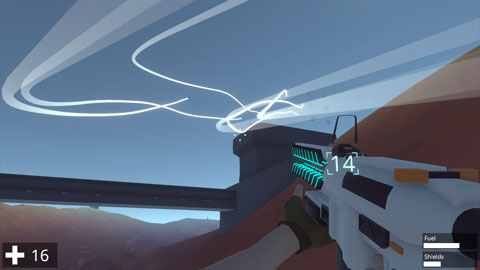
NeoFPS has a system that lets you build guided projectiles from a combination of a tracker component and a motor component. The tracker component is responsible for detecting and choosing a target, while the motor component is responsible for flying towards it. Currently there are 2 motor components available:
- The Simple Steering Motor simply turns towards the target each frame with a maximum steering rate that increases over time (this prevents the projectile from orbiting targets).
- The Drunk Missile Motor has a much more erratic flight path. At brief intervals it picks a random direction (tending towards the target) and turns towards that. Once the projectile gets close enough to the target it adopts a more standard steering system. The projectile can also boost its speed at random intervals as well. Together these give an effect similar to the missiles seen in anime.
There are a range of tracking options for guided projectiles in NeoFPS:
- The NearestObjectWithTagTracker component checks for colliders with a specific layer and tag in its vicinity. It will target the closest valid target.
- The PlayerTracker component homes in on the player character.
- The TargetingSystemTracker component defers its target selection to a separate targeting system. There are multiple targeting systems available, which are attached to the firearm. The ballistic shooter firearm modules will check for a targeting system on the firearm, as well as a TargetingSystemTracker on the projectile, and register the projectile with the targeting system if both are found. Targeting system options available are:
- LaserTargetingSystem which is attached to a WieldableLaserPointer. If the laser is on, the projectile will home in on the point the laser hits.
- RaycastTargetingSystem casts a ray from either the weapon or the camera, and passes the hit point to the projectiles. This can be a one-shot or continuous cast.
- TargetLockTrigger is a firearm trigger that checks for valid targets within a cone in front of the weapon. Holding the trigger will lock onto the target over time. Releasing the trigger before the lock completes will cancel the shot, while releasing the trigger after will fire the gun and pass the locked target to the projectile. The target is tracked continuously from that point until the projectile hits or is destroyed. You can cancel firing with the reload button.
- MultiTargetLockTrigger is a firearm trigger which locks onto multiple targets one by one as you hold the trigger. Releasing the trigger will fire as many shots as there were target locks in a burst. You can cancel firing with the reload button.
- TargetTrackingAmmoEffect allows you to tag a target with a shot, which the guided projectiles will then home in on. This can track moving targets, and will track the exact point on the target that the bullet hit. You can use this in conjunction with a the ModularFirearmModeSwitcher to allow you to switch weapon modes between tagging and missiles.